Monday, May 22, 2024

Gaming Peripherals: Wired vs Wireless Performance Differences
by
Published
Views:
Gaming Peripherals: Wired vs Wireless Performance Differences
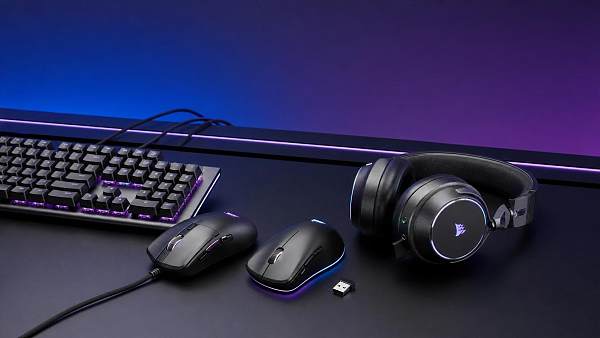
Choosing gaming peripherals sounds simple at first.
Then latency charts, polling rates, and battery claims start piling up.
That is where a practical comparison helps.
For most buyers, gaming peripherals are not just accessories.
They shape reaction speed, desk comfort, travel convenience, and long-session reliability.
The wired versus wireless debate has also changed a lot recently.
Older wireless gear often meant lag, dropouts, and heavy batteries.
Today, many premium wireless gaming peripherals perform close to wired models.
Still, close is not always the same as best.
Real-world performance depends on device type, setup quality, and how you actually play.
This guide breaks down the meaningful differences without the usual hype.
What Performance Really Means in Gaming Peripherals
When people compare gaming peripherals, they often focus only on latency.
Latency matters, but it is only one part of the experience.
A better buying decision looks at several connected factors.
- Input delay between action and on-screen response
- Signal stability during long or crowded sessions
- Battery life and charging behavior
- Weight, cable drag, and desk freedom
- Consistency across different games and devices
- Long-term durability and maintenance needs
That broader view makes wireless and wired gaming peripherals easier to judge fairly.
It also explains why one option can feel better even when the spec sheet looks similar.
Latency: The Most Discussed Difference
Latency remains the headline issue for gaming peripherals.
Wired devices send data directly through a cable.
That direct path usually keeps response times predictable.
Wireless gaming peripherals add radio transmission into the process.
In theory, that can add delay.
In practice, modern 2.4GHz wireless models have improved dramatically.
High-end wireless mice can now reach response levels that feel nearly identical to wired options.
That said, not all wireless technologies are equal.
2.4GHz vs Bluetooth
Bluetooth is convenient, but usually slower for competitive gaming.
Most serious wireless gaming peripherals use dedicated 2.4GHz dongles instead.
Those connections are designed for lower latency and steadier polling performance.
Does It Matter in Real Games?
In single-player games, many users will not notice a meaningful gap.
In tactical shooters, rhythm games, or esports titles, small delays feel more obvious.
If every millisecond matters, wired gaming peripherals still keep the cleanest edge.
Signal Stability and Interference Risks
Latency is only useful when it stays consistent.
This is where signal stability becomes a real buying factor.
Wired gaming peripherals are simple in this area.
If the cable and port are healthy, the connection is usually steady.
Wireless gaming peripherals depend on radio conditions around your setup.
Wi-Fi routers, metal desks, USB 3.0 noise, and distance can all affect performance.
The issue is less dramatic than it once was.
Even so, interference still shows up in some homes, dorms, and shared gaming spaces.
How to Reduce Wireless Problems
- Keep the dongle close to the mouse or keyboard
- Use the included extender when available
- Avoid placing the receiver behind a metal PC case
- Separate it from crowded USB devices
- Update firmware if the brand provides tuning improvements
These small setup choices often matter more than advertisements suggest.
Battery Life, Charging, and Daily Friction
This is where wireless gaming peripherals create their biggest tradeoff.
No cable feels great.
But batteries always add one more thing to manage.
Some gaming peripherals last several days with RGB on.
Others can stretch much longer if lighting is reduced.
Headsets often need more frequent charging than mice or keyboards.
That extra routine is minor for some users.
For others, it becomes annoying very quickly.
Why Wired Still Wins on Simplicity
Wired gaming peripherals are always ready when plugged in.
There is no battery anxiety before a ranked match.
There is no charging cable to hunt down late at night.
If convenience means fewer maintenance tasks, wired still has a strong advantage.
Weight, Mobility, and Comfort Over Time
Comfort can outweigh raw specifications.
This is especially true with mice and headsets.
Wireless gaming peripherals remove cable drag completely.
That freedom can make aiming feel smoother and desk movement cleaner.
For keyboard users, wireless also helps with flexible desk layouts.
For headset users, it adds freedom to stand up and move around.
Still, batteries can increase device weight.
That matters more on a mouse than on a keyboard.
Some premium wireless mice are now extremely light.
Lower-cost models often remain heavier than their wired alternatives.
Device-by-Device Buying Differences
Not all gaming peripherals should be judged with the same priorities.
Gaming Mice
This category shows the strongest case for wireless improvement.
Cable-free movement feels immediately better for many players.
If the sensor and dongle quality are strong, wireless can be an easy pick.
Gaming Keyboards
Latency matters less here than with mice.
Wireless works well for cleaner setups and multi-device switching.
Wired remains attractive for value, RGB power, and zero charging concerns.
Gaming Headsets
Wireless headset freedom is genuinely useful.
But battery life, microphone quality, and charging behavior matter more here.
A wired headset can still offer excellent value and stable audio performance.
Quick Comparison Table for Better Decisions
How to Choose the Right Gaming Peripherals for Your Setup
A smart choice starts with honest priorities.
Do not buy based only on marketing language like ultra-fast or pro-grade.
Instead, match the device to your real habits.
- If you play ranked shooters, prioritize low-latency wired or premium 2.4GHz models.
- If you hate desk clutter, wireless gaming peripherals will probably feel worth the tradeoff.
- If you often forget charging, avoid wireless headsets or keyboards with short battery life.
- If budget matters most, wired gaming peripherals usually deliver stronger value per dollar.
- If you switch between work and play, wireless devices with multi-device support can be practical.
From a long-term value angle, reliability often matters more than headline speed.
That is especially true when gaming peripherals are used every day.
Final Take: Wired vs Wireless Is About Fit, Not Hype
The performance gap between wired and wireless gaming peripherals is smaller than before.
That is the clearest shift in today’s market.
Yet smaller does not mean irrelevant.
Wired gaming peripherals still lead on predictability, simplicity, and cost efficiency.
Wireless gaming peripherals shine in freedom, cleaner setups, and daily comfort.
The best choice depends on what kind of friction you notice most.
If you notice every missed input, go wired or choose top-tier wireless carefully.
If cables bother you more than charging, wireless will likely feel like a real upgrade.
Use that tradeoff as your final filter.
That approach leads to better gaming peripherals, better value, and fewer regrets after purchase.

The Archive Newsletter
Critical industrial intelligence delivered every Tuesday. Peer-reviewed summaries of the week's most impactful logistics and market shifts.